
Dollarwise: Budget & Tracking
HammerMediaFinance
3.31.16K Reviews
- Version
- 6.4.0
- Installs
- 100.00K
- Age Rating
- Everyone
Screenshots
Our Review of Dollarwise: Budget & Tracking
 Analysis by Appyee
When I judge a budgeting app, I look beyond whether it can display a spending chart: I want to know whether I can understand it quickly, correct a mistake without a struggle, and use it in the situations where I actually make money decisions. Dollarwise: Budget & Tracking aims to bring income, expenses, budgets, and savings goals into one place. Its clean presentation is appealing, but a finance app also needs to earn trust through clear, dependable workflows, so I’d approach it as a tool to try carefully rather than a magic fix for spending habits.
First Impressions and Interface
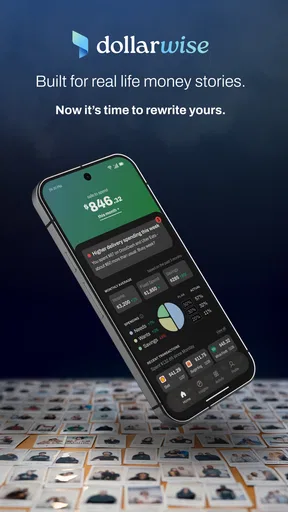
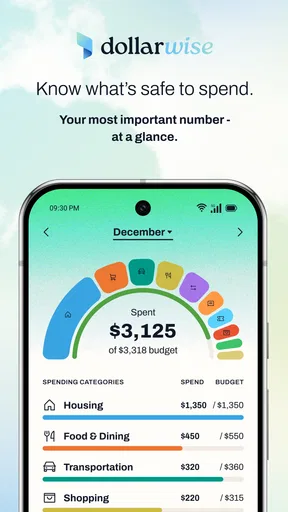
From the moment you open Dollarwise, you're greeted with a clean and intuitive interface that’s easy on the eyes. The design focuses on simplicity, which is great for those of us who might feel overwhelmed by too much information at once. The home screen presents a quick snapshot of your financial health, showing your total income, expenses, and remaining budget at a glance.
The navigation is pretty straightforward. You’ll find it easy to move between different sections like budgeting, tracking, and reports. I appreciated the use of color coding for different categories, which makes it a breeze to identify where your money is going.
Reading the overview at a glance
A single-screen summary can help when I only have a moment to check whether my plan is holding up. I’d use the overview as a prompt for a closer look, not as a final verdict: one large purchase can make a category look alarming even when it was planned, while several small purchases can blend into a total that seems harmless. Opening the relevant category before changing a budget keeps the overview useful without letting a quick visual impression drive a poor decision.
Color coding can speed up scanning, but it should support the labels rather than replace them. If I’m checking figures in bright light, using a phone at night, or sharing the screen with someone who reads colors differently, I want to confirm the category name and amount as well. That habit makes the visual design a bonus instead of a barrier.
Setting Up Your Budget
Setting up a budget in Dollarwise is as easy as pie. The app guides you through entering your income and setting limits for various spending categories such as groceries, rent, entertainment, and more. It even suggests amounts based on your income level, which is a nifty feature for those who aren’t quite sure where to start.
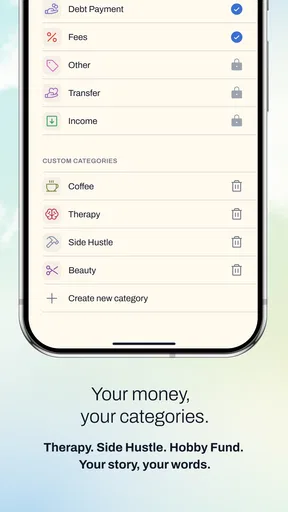
You can customize categories to fit your unique spending habits. For instance, if you’re a coffee lover like me, you might want to create a separate category just for your caffeine indulgences. The app allows for flexibility, which is a huge plus.
Building a budget that survives real life
I’d treat suggested amounts as a first draft, then compare them with bills and spending I already know are coming. A category limit only helps if its timing matches the way money leaves your account. For instance, rent may be paid once a month, while groceries are bought repeatedly; looking at those as if they behave the same can make a sensible budget feel broken. Setting limits around the rhythm of your own expenses is more useful than trying to copy a perfectly neat template.
Custom categories are most helpful when they answer a real question. If coffee purchases are frequent enough that I want to change them, separating them from general food spending gives me a clearer signal. If I would never act differently based on that detail, keeping the category broad is less work. The trade-off is simple: extra detail can reveal habits, but too much categorizing turns a quick check-in into bookkeeping.
Expense Tracking and Insights
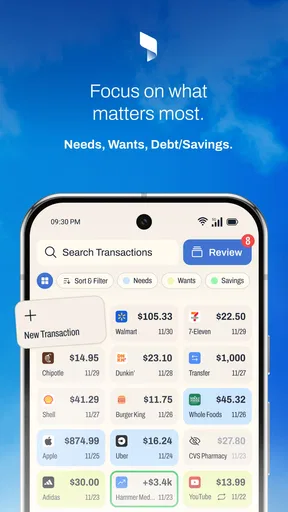
Tracking expenses is where Dollarwise truly shines. You can manually enter each transaction, or take advantage of the app's ability to sync with your bank accounts. This automatic syncing saves a ton of time and ensures your data is always up to date.
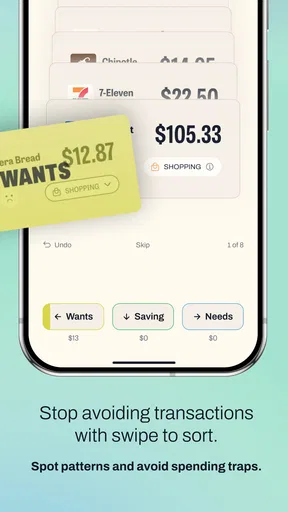
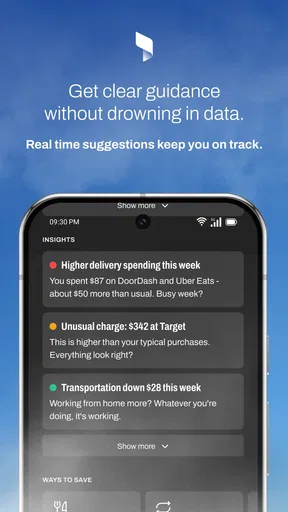
The app categorizes your expenses automatically, although you can adjust them if needed. Over time, Dollarwise provides insights on your spending habits, helping you to identify areas where you might be overspending. I found this feature incredibly useful for pinpointing those sneaky little expenses that add up over time.
Choosing a tracking routine
Bank syncing and manual entry suit different people, and neither is automatically the better choice. If I want a low-effort record, linking an account can reduce repetitive work; I’d still review the categories rather than assume an automated label is always right. If I prefer not to connect an account, manual entry gives me a more deliberate view of each purchase, but it depends on remembering to log transactions. A short daily check is more realistic than trying to reconstruct a week of receipts from memory.
A practical routine is to check new activity at a calm time, correct any category that would distort the budget, and then leave the app alone until the next planned review. That avoids reacting to every individual purchase. It also helps distinguish a genuinely recurring leak from a one-off expense, which matters before deciding to cut a category that may simply have had an unusual week.
Reports and Analytics
If you’re a data nerd or just someone who loves tracking every detail, you’ll appreciate the robust reporting features. The app offers a variety of reports that show trends in your spending and saving over time. Visual charts and graphs make it easy to understand your financial situation at a glance.
The ability to export these reports can be handy if you want to share them with a financial advisor or just save them for your records. The app’s analytics are a powerful tool for anyone serious about improving their financial health.
Turning reports into decisions
Reports are most valuable when I use them to answer one specific question, such as whether takeout is displacing grocery spending or whether a goal is progressing at a pace I can maintain. I wouldn’t treat a graph as advice by itself. Before changing a limit, I’d check whether the period includes an irregular bill, a trip, or another unusual expense; otherwise, a temporary spike can lead to a budget that is too strict for ordinary life.
Exporting also changes how I’d use the app. A saved report can make a conversation with an adviser or a household budgeting partner more concrete, but I’d share only what is needed and check the file before sending it. For a person who wants only a simple monthly total, this reporting depth may be more than necessary; a basic spreadsheet or a bank’s own summaries could be quicker.
Savings Goals and Motivation
Who doesn’t love achieving goals? Dollarwise allows you to set and track savings goals. Whether you’re saving for a vacation, a new gadget, or just trying to build an emergency fund, the app keeps you motivated by showing your progress.
The motivational quotes and tips sprinkled throughout the app provide that extra nudge you might need to stay on track. It’s like having a little cheerleader in your pocket, encouraging you to hit those financial milestones.
Making a goal workable
I’d make a goal specific enough to guide a choice but flexible enough to survive a changed month. For example, if I’m saving for a trip, I can check progress before booking extras rather than waiting until the final week to discover the budget is tight. An emergency fund is a different kind of goal: consistency matters more than a flashy target, and I’d avoid treating a slower month as failure.
Encouraging messages may be pleasant, but motivation is personal. Some people like a reminder that keeps a goal visible; others would rather see neutral figures and make their own plan. If tips or quotes feel like background noise, the practical value still comes from setting a goal and checking whether the amount I’m putting aside fits my actual cash flow.
Using it in an ordinary week
Imagine I buy groceries after work, pay for a coffee the next morning, and later notice a household bill has landed. A useful routine is to check the recorded transactions together rather than judge each purchase in isolation. I can see whether the grocery category is close to its limit, correct a misclassified item, and then consider the bill against the rest of the month. That sequence turns tracking into a small decision-making habit instead of a source of guilt.
For a couple or family, the app may help one person prepare a clear picture of spending to discuss with the others, especially if categories reflect shared priorities. I would not assume that a shared view or collaborative access works in a particular way; the safer approach is to agree on who enters or reviews information and use an appropriate method for sharing any report. If several people need live, coordinated access, a service designed around household collaboration may be a better fit.
Where it sits among finance tools
Compared with a spreadsheet, Dollarwise offers a more guided path through categories, tracking, goals, and visual reports, while a spreadsheet gives me more control over formulas and layout. Compared with a bank’s built-in spending summary, the app’s budgeting and savings focus may be more useful for planning ahead, while the bank can be more convenient for someone who wants to stay within one familiar account. These are different trade-offs, not a contest with one universal winner.
I’d choose a dedicated budgeting app if I’m willing to review my plan regularly and want to see spending alongside goals. I’d choose a spreadsheet if I need a very particular method, and I’d stick with a bank summary if I only want occasional awareness without maintaining categories. Dollarwise’s mix makes most sense for someone who will use both the quick overview and the deeper checks, rather than install it and expect the budget to manage itself.
Readability, comfort, and access in context
The uncluttered screen and category colors can make financial information feel less intimidating, particularly for someone who is new to budgeting. Still, an interface that looks simple to one person may not be comfortable for everyone. I’d test whether the text, contrast, and controls are easy for me to use on my own device before relying on the app for a time-sensitive decision. The safest approach is to check a figure carefully rather than depend on color or a quick glance alone.
Motor and sensory needs also affect the best routine. If entering every transaction is tiring or difficult, manual tracking may become a burden; bank syncing could reduce that effort, though I’d still want to review its results. If frequent visual checks are uncomfortable, a planned weekly review may be more manageable than opening the app repeatedly. These are practical ways to adapt how I use it, not guarantees that every interaction will suit every person.
Situational access matters too. A quick check while commuting, shopping, or standing in a queue is not the best moment to revise a budget or inspect a report. I’d use the glanceable overview for orientation and save corrections, exports, or bigger decisions for a quieter setting. Anyone who needs a specific accessibility feature or a particular way to navigate should test that directly before moving important financial routines into the app.
Costs, trust, and who should think twice
Dollarwise is free to install, but it also offers in-app purchases, with listed items ranging from $14.99 to $499.99. That wide spread makes it sensible to inspect the purchase screen and understand what an item includes before spending. I would begin with the free experience, decide whether the basic workflow genuinely helps, and only then consider paying for anything. For a simple spending diary, a costly upgrade may be hard to justify when a spreadsheet or existing bank tools already do the job.
The app is made by HammerMedia, and its average rating is 1.9 from around 1,700 ratings, alongside about 850 written reviews. I take that reception as a reason to be deliberate, not as proof that the app will work poorly for every person. It has passed 100,000 installs, is rated for everyone, and its current version is 6.0.0; it was released on January 9, 2025, and requires Android 7.0 or later. Those details help frame whether it fits your device and expectations, but they don’t replace checking the actual experience that matters to you.
Conclusion
Overall, Dollarwise: Budget & Tracking is a solid choice for anyone looking to take control of their finances. Its user-friendly interface, comprehensive features, and insightful analytics make it a standout in the crowded field of budgeting apps. Whether you’re just starting out or looking to refine your budgeting skills, this app offers the tools you need to succeed.
So, if you’re ready to make every dollar count and achieve your financial goals, give Dollarwise a try. It just might be the budgeting companion you’ve been looking for.
Verdict
Strengths of Dollarwise: Budget & Tracking
- User-friendly interface with intuitive navigation.
- Customizable budget categories for personalized tracking.
- Real-time expense tracking with instant updates.
- Secure data encryption ensures privacy and safety.
- Offers insightful financial reports and graphs.
Limitations of Dollarwise: Budget & Tracking
- Limited features in the free version.
- No offline mode available for use without internet.
- Occasional sync issues with bank accounts.
- Ads can be intrusive in the free version.
- Limited customer support response time.
Similar Picks in This Category
View All
Google Wallet
Google LLC4.3

Airtel: Recharge, Bank & Loans
Airtel4.0

PayPal - Pay, Send, Save
PayPal Mobile4.2

DANA Indonesia Digital Wallet
PT Espay Debit Indonesia Koe4.5

Binance: Buy Bitcoin & Crypto
Binance Inc.4.8

Cash App
Block, Inc.4.7
Frequently Asked Questions
What features does Dollarwise: Budget & Tracking offer?
Dollarwise provides a comprehensive suite of features, including expense tracking, budget planning, and financial forecasting. Users can categorize expenses, set savings goals, and receive insights through customizable reports. The app also offers synchronization across devices, ensuring that your financial data is always up-to-date and accessible.
Is Dollarwise safe to use for managing my finances?
Yes, Dollarwise prioritizes user security by implementing advanced encryption technologies to protect your data. The app does not store sensitive information on local devices, reducing the risk of unauthorized access. Regular security audits are conducted to ensure the highest level of protection for your financial information.
Can Dollarwise be used without an internet connection?
Dollarwise offers limited functionality offline, allowing you to input and categorize expenses. However, features like real-time synchronization and cloud backups require an internet connection. This ensures your data is consistently updated and accessible from any device once you're back online.
How does Dollarwise help in achieving financial goals?
Dollarwise assists users in reaching their financial goals by providing tools for setting budgets and tracking progress. The app allows you to set specific savings targets and monitors your spending habits, offering insights and alerts to help you stay on track. Personalized recommendations further enhance your ability to manage finances effectively.
Is there a subscription fee for using Dollarwise?
Dollarwise offers both a free version and a premium subscription. The free version includes essential budgeting tools, while the premium version unlocks advanced features such as detailed analytical reports, multi-currency support, and priority customer support. Pricing details are available on their website, with various plans to suit different needs.
